
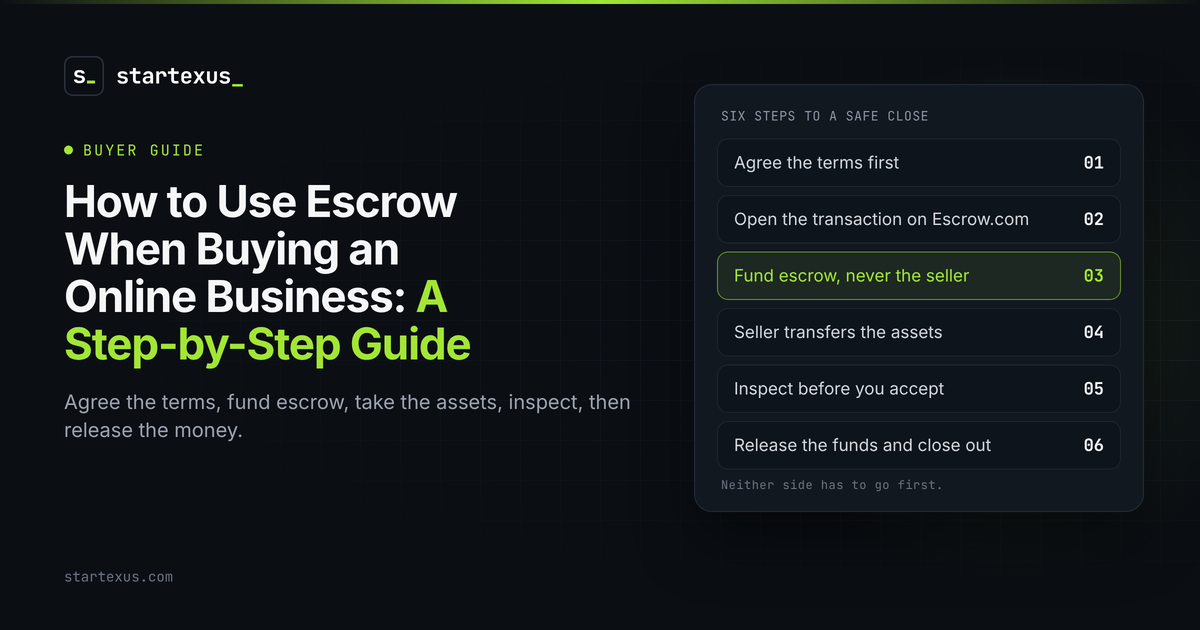
Paying for an online business is the easy part. Getting the business is the hard part. Send the money first and you are trusting a stranger to hand over a domain, a codebase and a Stripe account. Hand over the assets first and the seller is trusting you to pay.
Escrow fixes that. A neutral third party holds the money until the buyer confirms everything arrived. Neither side has to go first.
This is the step-by-step guide I would hand a friend closing their first deal. It uses Escrow.com, the licensed escrow company StartExus recommends for most deals. The deal figures below are illustrative examples, not a real listing.
1. Agree the terms before you open escrow
Escrow only enforces what you both wrote down. Settle the details first.
- Price and structure. One payment, or part paid later. Staged payments need a different setup, and Escrow.com offers milestone transactions for them.
- The asset list. Domain, code, hosting, payment processor, email list, social accounts, content. If it is not on the list, you may not get it.
- The inspection period. How long you get to check everything after the transfer. Escrow.com allows 1 to 30 calendar days.
- Who pays the fee. Buyer, seller or a split. Decide now, not at checkout.
- Put it in writing. Our asset purchase agreement guide covers what to include.
2. Open the transaction on Escrow.com
One side creates the transaction. Both sides register and agree to the same terms.
- Go to the site yourself. Type escrow.com into your browser. Do not click a link a stranger sent you.
- Pick the right type. Escrow.com has a flow for websites and domains with content. Describe exactly what is being sold.
- Match the terms. Price, asset list, inspection period and fee split should match your agreement word for word.
- Check the fee. Escrow.com charges a percentage of the price on a sliding scale, with minimums. Use its fee calculator for your amount.
3. Fund escrow, never the seller
Now the buyer pays. Not the seller. Escrow.com.
- Use the instructions in your account. Payment details should come from inside your Escrow.com account, not from an email.
- Expect a wire for larger deals. Card and PayPal add a processing fee and come with restrictions.
- Wait for confirmation. Once Escrow.com verifies and secures the payment, it tells the seller to start the transfer.
- Red flag. A seller who pushes you to skip escrow, pay directly or pay in crypto. Walk away.
4. The seller transfers the assets
This is where the business actually changes hands. Use a checklist. On StartExus, the deal room has a transfer checklist you both track.
- Domain first. Moved to your registrar account, or pushed to your account at the same registrar.
- Code and hosting. Repository ownership, server or hosting account, and the keys to deploy.
- Money accounts. Payment processor, ad and affiliate accounts. Some cannot change owner, so you may need your own and a migration.
- Audience and content. Email list export, social accounts, content files, support inbox.
- Seller marks it transferred. That tells Escrow.com and you that delivery is done.
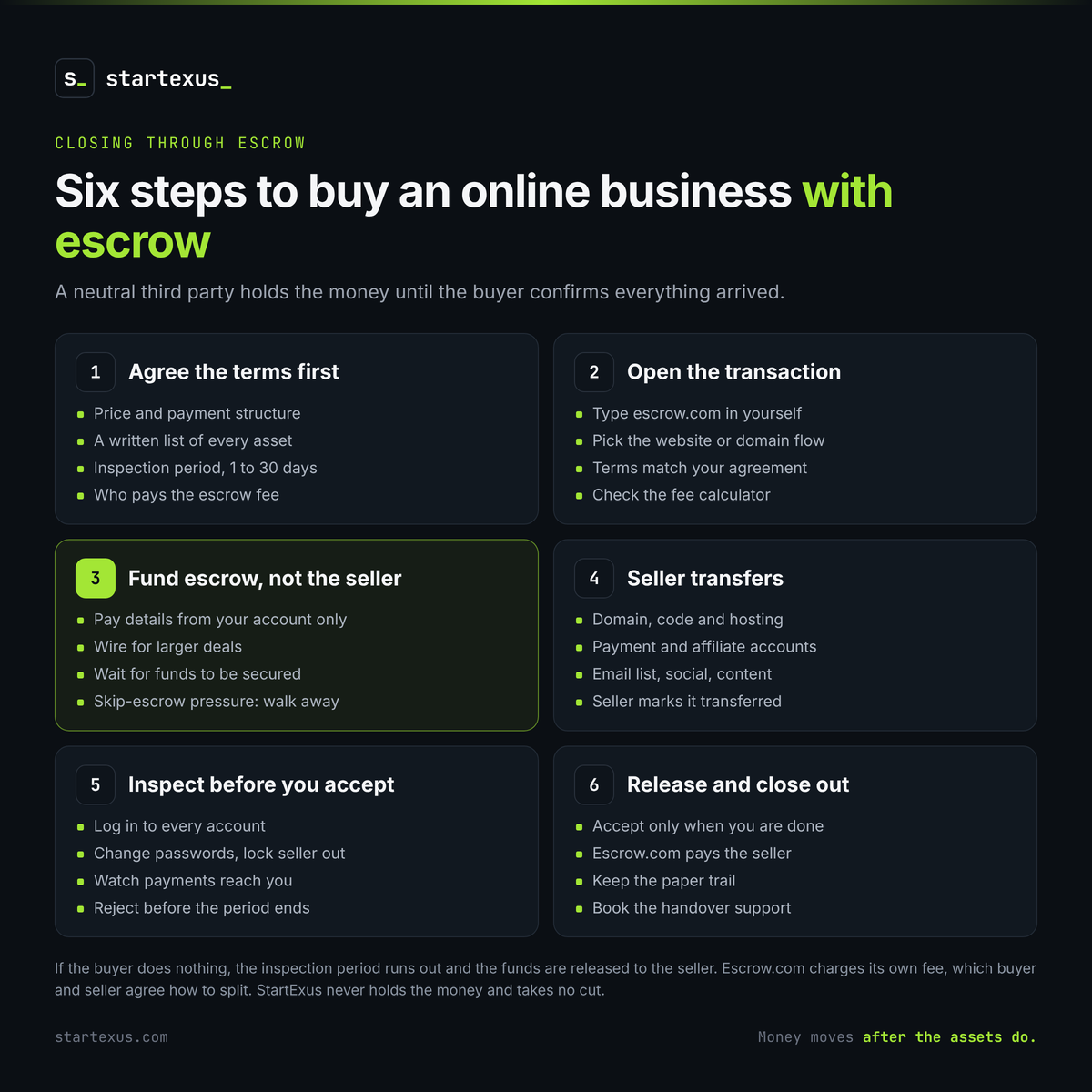
5. Inspect before you accept
The inspection period starts when you mark the assets as received, or when Escrow.com confirms delivery. Use every day of it.
- Log in to everything. Every account on the asset list, under your own name.
- Change the passwords. Then check the seller can no longer get in.
- Watch the money land. Confirm new payments reach your account, not the seller's.
- Test the product. Sign up, pay, cancel, deploy a small change.
- Reject in time if you must. If something is missing and the seller will not fix it, reject before the period ends. Rejecting means returning what you received, and Escrow.com keeps its fee. If you do nothing, the period runs out and the funds go to the seller anyway.
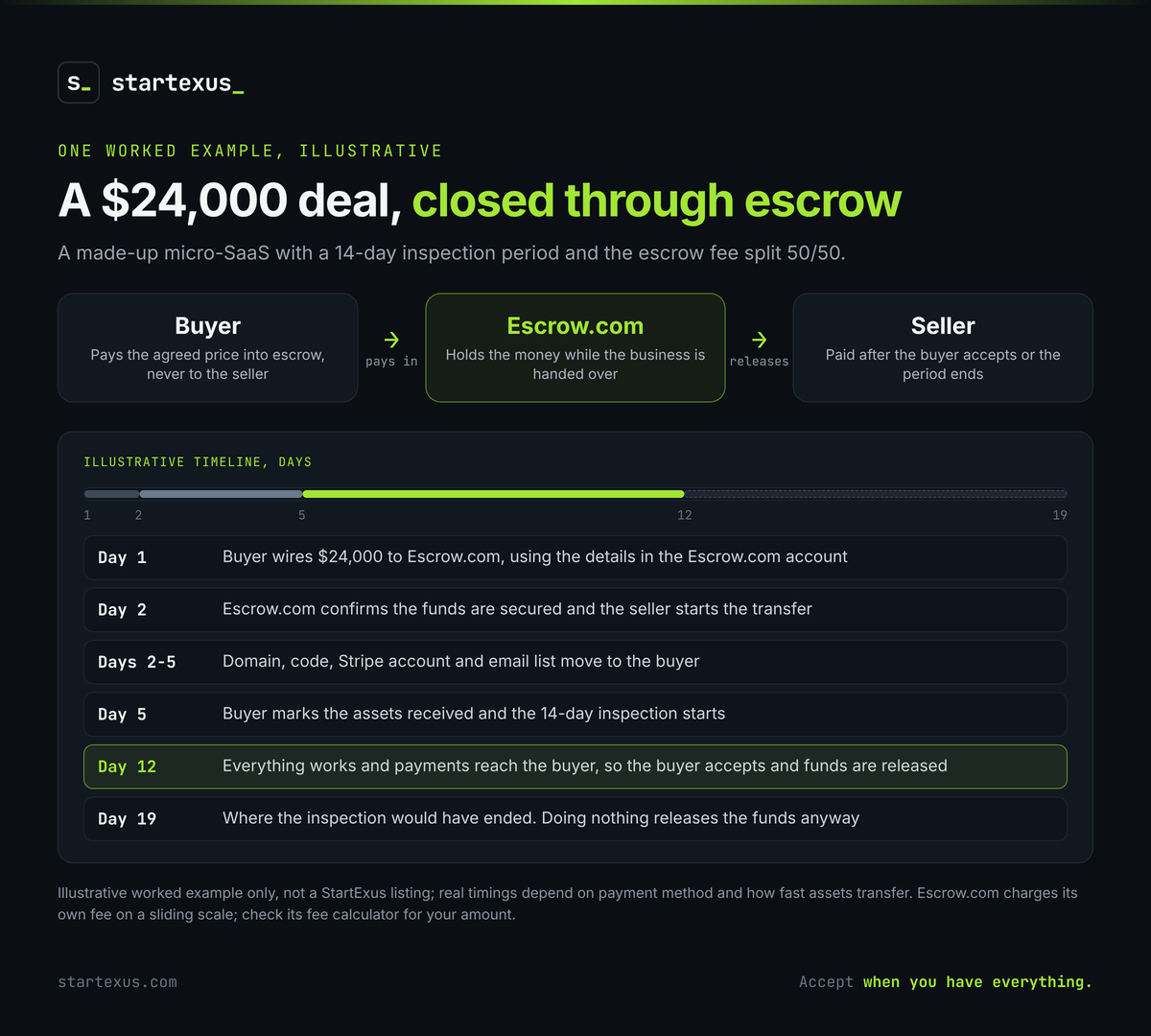
Example (illustrative, not a real listing): a $24,000 micro-SaaS, 14-day inspection, escrow fee split 50/50. Day 1, the buyer wires the money. Day 2, Escrow.com confirms funds and the seller starts the transfer. Days 2 to 5, domain, code, Stripe and email list move over. Day 5, the buyer marks it received and the 14 days begin. Day 12, everything works and payments land in the buyer's account, so the buyer accepts. The seller is paid without waiting for day 19.
6. Release the funds and close out
Accepting is the buyer saying: I have everything. Escrow.com then pays the seller.
- Accept only when you are done. Accepting ends the inspection period and releases the money.
- Seller gets paid. Escrow.com sends the funds, minus any fee the seller agreed to pay.
- Keep the paper trail. Agreement, transfer checklist and Escrow.com records.
- Use the handover support. If your deal includes a few weeks of seller help, book it now.
Common mistakes
- Paying the seller directly to save the fee.
- Opening escrow before the asset list is agreed.
- Picking a 3-day inspection for a business that takes a week to transfer.
- Following payment instructions from an email instead of your Escrow.com account.
- Accepting before the payment processor is in your name.
- Letting the inspection period run out while you wait on the seller.
The bottom line
Escrow turns a leap of faith into a checklist. Agree the terms, fund escrow, take the assets, inspect, then release the money. In that order.
On StartExus, you close however you both agree, and for most deals we recommend Escrow.com, so the buyer's money is held until the transfer is confirmed. How it works shows each step. StartExus never holds the money and takes no cut. Escrow.com charges its own fee, which buyer and seller agree how to split. Escrow protects the payment, not the price, so do your own due diligence before you get here.
Ready to look? Browse online businesses for sale on StartExus, read the FAQ on payments and safety, or list your business for sale for free, with no listing fee and no success fee.
Tags
- online business
- due diligence
- saas
- ai